What it is
A system pack, not a single template page: four databases plus the guides to wire them together in your own Notion workspace. A free Notion plan is enough for these databases.
What is inside
- 4 CSV libraries: Clients (8 sample rows), Projects (7), Quotes & Invoices (9, one database split by Type), Follow-ups Pipeline (8).
- Import guide — import each CSV, fix property types, then build the relations step by step.
- Views checklist — which views to set up, starting with a Follow-ups Board by Stage and an Overdue view.
- Workflow guide — the lead → paid standard operating procedure.
How it works — what you see after import
- Import the 4 CSVs into your own Notion workspace (a free plan is enough), one database per file: Clients, Projects, Quotes & Invoices, Follow-ups Pipeline.
- Fix property types and build the relations following the import guide — about 20–30 minutes for all four databases. CSV import cannot create Relations automatically, so this step is manual by design.
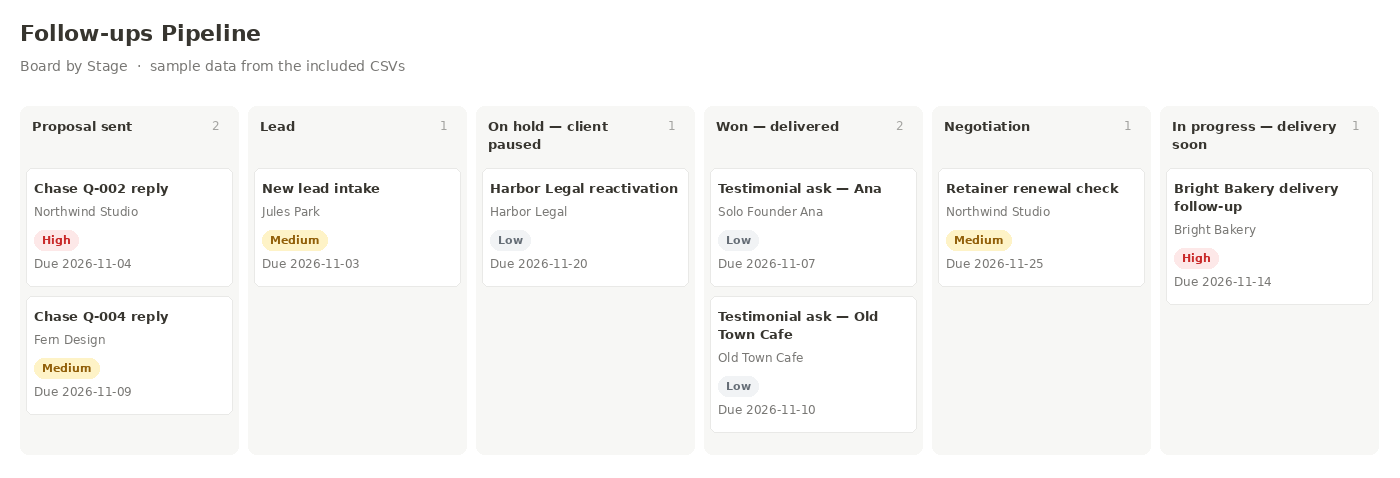
- Set up the two starter views from the views checklist: the Follow-ups Board by Stage (below) and an Overdue view, so nothing slips past its due date.
- Work the pipeline daily: each follow-up card shows its client, priority, next action and due date; move it across stages from Lead to Won.
| Database | Sample rows | Key columns |
|---|---|---|
| Clients | 8 | Name, Company, Client Type, Status, Source |
| Projects | 7 | Project Name, Client, Service Type, Status, Price, Progress % |
| Quotes & Invoices | 9 | Number, Type, Client, Project, Amount, Status |
| Follow-ups Pipeline | 8 | Title, Client, Stage, Priority, Next Action, Due Date |
Setup limits — stated plainly before you buy
- Notion CSV import CANNOT automatically create Relations. The Client, Project, and Related columns arrive as plain text. Converting them to real relations is a manual step in the guide — allow about 20–30 minutes for all four databases, including relations.
- Formulas and Rollups must be rebuilt in Notion. Formulas do not survive CSV import, so they do not arrive pre-built — recreate them in Notion if you want them.
- Sample data is fictional and must be deleted or rewritten. All sample rows use fictional names and example emails. Delete them or rewrite one row per database as your first real record — do not send a quote or invoice to a sample address.
- There is NO one-click Notion template link. This pack ships CSVs you import into your own workspace. No template link is included, and none is claimed.
License for buyers
Personal and commercial use for one freelancer's own business. Do not resell, re-share, or publish the CSVs and guides as your own template. Sample data may be deleted freely.
Buy — $49 one-time
One-time payment, no subscription. After paying, come back here and redeem with your PayPal transaction ID.
I already paid
Honest limits — this purchase
- One-time payment, no subscription.
- Download token lasts 24 hours. Your download link is valid for 24 hours. Keep your PayPal transaction ID — you need it to redeem.
- Packs are delivered as zip downloads via the gated endpoint only. There are no direct file links on this site.